Google Business Profile in Miami: stand out on Google and Maps
When someone searches for your service, your Google profile is the first thing they see: your reviews, your phone, and your location — before any website. We set it up, verify it, and optimize it so you show up on Google Maps and they call you.
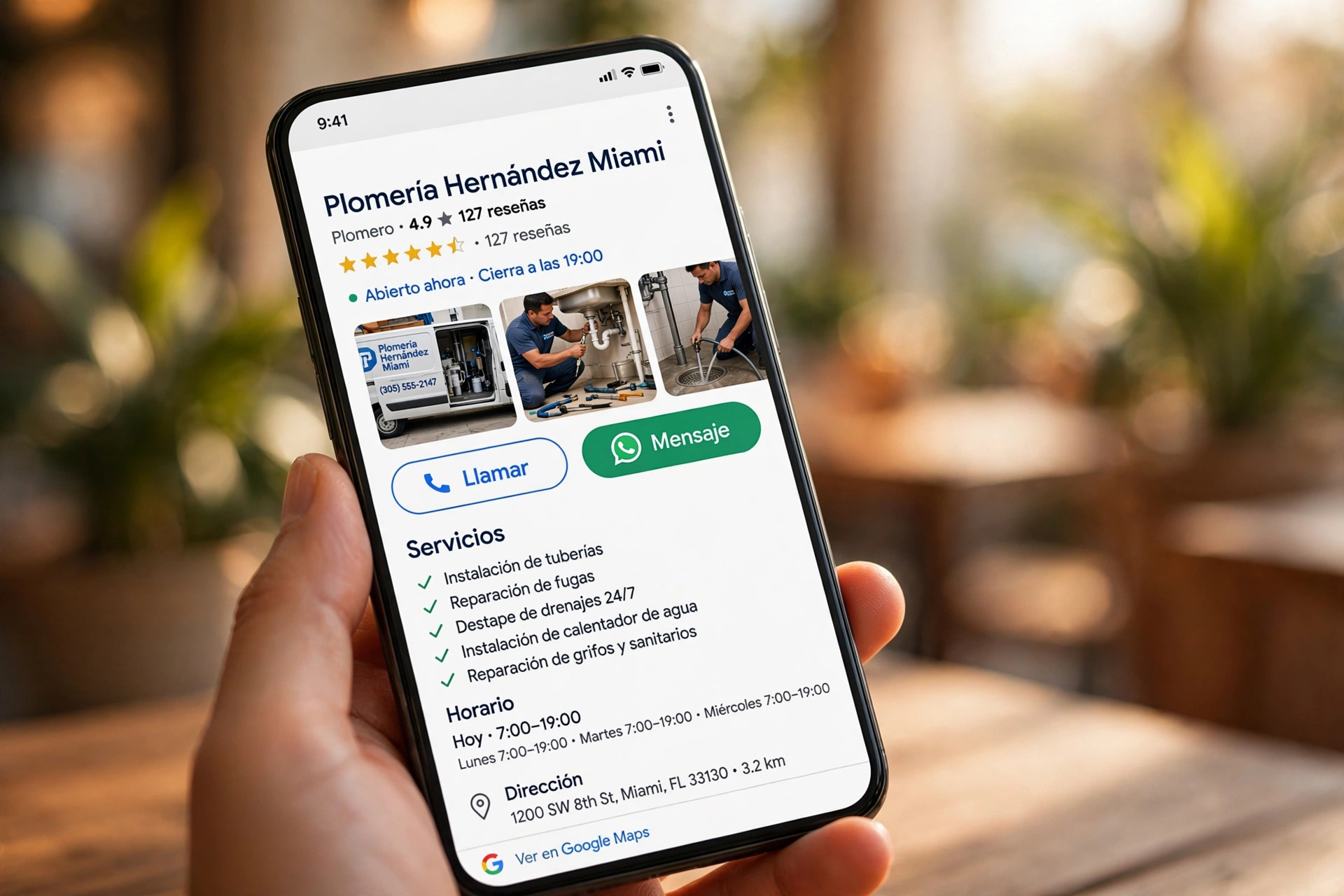
Google Business Profile
Full setup, verification, and optimization of your profile.
One payment to set up, verify, and optimize your listing. Optional monthly management: $99.99/month.
- Setup and verification of your profile
- Correct categories, services, and area
- Optimized photos and complete data
- Strategy to get more reviews
- Everything in English and Spanish, without you lifting a finger
Comparing options to get found on Google? See also how much local SEO costs in Miami.
Your Google listing, complete and verified
Your Google profile is your most powerful free showcase. We make it impeccable.
Setup and verification
We create your profile from scratch if you don't have one and complete the verification process with Google — where most people get stuck. If your business already shows on the map but the listing isn't yours, we claim it and give you back control.
Complete optimization
Correct categories for your trade, full service list, service area, hours, optimized photos, and a description that sells. We also take care of special holiday hours — so you never show as closed on a day you're actually working — your business attributes (the payment methods you accept, parking, whether it's a women-led business) and your profile's questions and answers, answered ahead of time so nobody hesitates before calling you.
Review strategy
Reviews carry the most weight on Google Maps. We give you a simple system to ask every satisfied customer for one — at the right moment, without being pushy — and teach you how to reply: including the less-than-five-star ones, which, answered well, sell better than perfect ones.
Posts and offers
We activate your profile's posts to showcase offers, recent jobs, and news. An active profile ranks better.
Visible call button
We make sure your phone number is correct and visible. Many customers call right from the profile without opening your site.
Foundation for Local SEO
An optimized profile is the first step of local ranking. If you later want to go further, our Local SEO builds on this foundation. And for customers on iPhone, we also put you on Apple Maps.
Want the step-by-step? We explain how to ask for Google reviews without breaking the rules.
How do you show up on Google Maps? Here's the process
When someone searches for your service "near me," Google decides in seconds who to show on the map: it checks that your listing is verified, that your category and area match the search, and that you have recent reviews. That's why order matters: first the foundation, then the activity.
1. Setup or claim
We create your Google business profile or claim the one that already exists under your name, with the right name, category, and service area from day one. No keyword-stuffed names: that breaks Google's rules and puts your listing at risk.
2. Verification
Google checks that your business is real — often asking for a video of your premises, your vehicle, or your tools — and that's where most people get stuck. We walk with you step by step until your listing is verified, because without verification your business barely shows.
3. Complete optimization
Categories, services with descriptions, hours and special hours, photos of your real work, attributes, and a clear description: everything Google looks at to decide who shows first on the map, and everything your customer looks at to decide who to call.
4. Reviews and activity
We set up the system to ask every customer for a review, plus your profile posts. An active listing with recent reviews is the one that gets the call when two businesses offer the same thing.
And after? The listing stays in your hands, ready and working. If you'd like, we keep it active with monthly management; if you'd rather run it yourself, we leave everything explained. What we won't do is leave your listing half-finished — which is how most of them end up.
Everything we set up on your listing
So you know exactly what you're paying for: this is what's configured when we're done.
- Correct name and primary category — the primary category carries the most weight when people search for your trade.
- Secondary categories and service list, each with a clear description.
- Exact address or service area, depending on whether you work from a shop or on the road.
- Hours and special holiday hours, so "open now" works in your favor.
- Visible phone number and link to your website: one tap and they're calling you.
- Photos of your real work: your team, your vehicle, your before-and-afters — no generic stock photos.
- Complete attributes: payment methods you accept, parking, accessibility, and whatever sets your business apart.
- Your profile's frequently asked questions answered, and your first welcome post live.
And something important: the listing stays in your name and under your control. It's your business and your asset: we get it working and you own it, as it should be.
Mistakes that leave businesses invisible on Google
Most businesses that "don't show up on the map" don't have a luck problem: they have one of these five mistakes — and every one of them can be fixed.
The wrong primary category
Google shows your business based on that category: if it says something else, you won't appear when people search for what you do — even if you do everything else right.
Duplicate listing
Two profiles for the same business split your reviews, and Google ends up hiding both. You keep one and close the other properly.
A name stuffed with keywords
Naming your business "Best Cheap Plumber in Miami" breaks Google's rules and can get your listing suspended overnight.
Not verified
An unverified listing barely shows. Verification isn't just paperwork: it's the switch that turns on your presence on the map.
Mismatched information
If your phone or hours say one thing on Google and another on your website, Google trusts your listing less — and so do your customers.
An abandoned listing
No new photos, no posts, and reviews left unanswered tell Google your business is asleep — so it shows the active competitor first.
No storefront? You can still show up on the map
If you work at customers' homes — plumbing, air conditioning, remodeling, cleaning — your listing is set up by service area: you show up on Google Maps in the neighborhoods where you work, without showing your personal address. It's the setup most contractors use, and getting it right is part of our job.
Many contractors never even try to appear on Google because they think you can't without a shop — and they leave that space wide open for the competitor who set it up properly. With your service area defined, your services listed, and real customer reviews, your business competes on the map on equal footing with the shop on the corner.
Clear pricing, like everything we do
Creating your Google listing from scratch, verifying it, and leaving it fully optimized costs $350, one-time. If you already have a listing and it only needs optimization, on the free call we review it and confirm the price before we start: no surprises.
- Complete setup and verification
- Total profile optimization
- Review strategy included
- Support in English and Spanish on WhatsApp
Want us to also keep it active month after month — posts, reviews answered, and your information always up to date? Monthly management is optional and costs $99.99/month, with no lock-in contract.
Request a quote on WhatsAppQuestions about Google Business Profile
Why is your Google profile so important?
Because it's the first thing customers see when they search for your service on Google or Google Maps: your name, your reviews, your phone, and your location show up before any website. Many customers call directly from there, without visiting your site.
I already have a profile, but I'm not sure it's set up right
Most profiles are half-done: wrong categories, unlisted services, old photos, or outdated info. On the free call we review your profile and tell you exactly what to improve, no commitment.
How much does it cost to optimize my Google Business Profile?
It costs $350, one-time: it includes setting up or claiming your listing, verification, and complete optimization. If your listing already exists and only needs optimization, on the free call we review it and confirm the price before we start. And if you want ongoing management — posts, reviews answered, and information kept up to date — it's optional at $99.99/month, with no lock-in.
Do you handle reviews?
We give you a simple system to get more reviews from real customers — the factor that carries the most weight on Google Maps — and teach you how to reply to them well. If you'd rather not deal with that, monthly management of your listing ($99.99/month, no lock-in) includes replying to your reviews and keeping your profile active.
How long does it take for my business to appear on Google Maps?
Verification takes as long as Google decides (sometimes days; video or postcard verification can take longer). Once your listing is verified and optimized, it starts showing; reviews and activity do the rest over the following weeks.
I already have a listing, but it's suspended or duplicated. Can it be fixed?
In most cases, yes. We review what Google flagged, fix the problem, and file the reinstatement request with the evidence Google asks for. We'll tell you honestly whether your case can be fixed before you pay anything.
Do I need a website to have a Google listing?
No: the listing is free and works on its own. What does happen is that they reinforce each other — the listing puts you on the map and your website convinces whoever clicks — which is why our website packages include the listing.
Let's talk about your project?
Book a free phone or video call and we'll review how your Google profile looks today. No commitment, in English and Spanish.